# multi-swe-bench / mui__materialui32713 - taskset: [multi-swe-bench](https://harnessreport.com/tasks/multi-swe-bench.md) - difficulty: easy - category: software-development - language: - runnable from the site: no - agent timeout: 14400s ## Results by harness _none yet_ ## Instruction ``` <uploaded_files> /workspace/material-ui </uploaded_files> I've uploaded a Typescript code repository in the directory /workspace/material-ui. Consider the following issue description: <issue_description> # [system] Fix toolbar media query mixin getting merged in wrong order <!-- Thanks so much for your PR, your contribution is appreciated! ❤️ --> - [x] I have followed (at least) the [PR section of the contributing guide](https://github.com/mui/material-ui/blob/HEAD/CONTRIBUTING.md#sending-a-pull-request). Solution was proposed in https://github.com/mui/material-ui/issues/27532#issuecomment-1009737476 The styles were getting injected in the wrong order. Before: 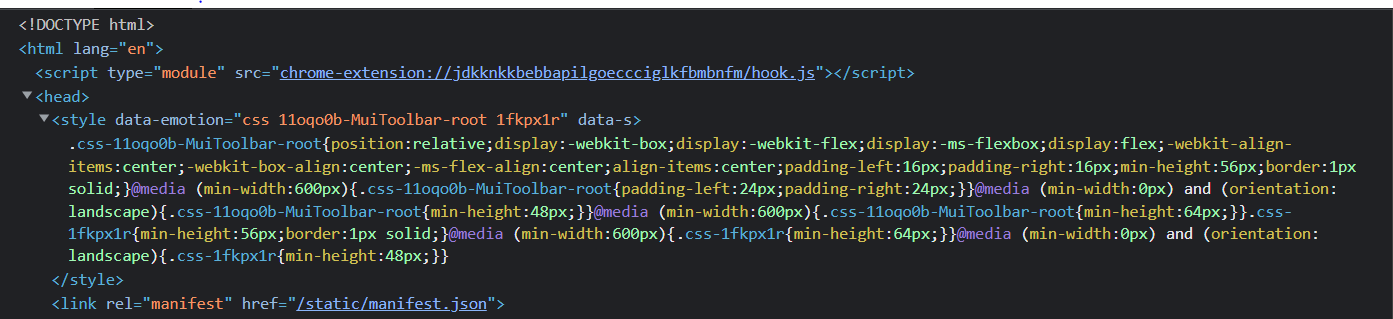 After: 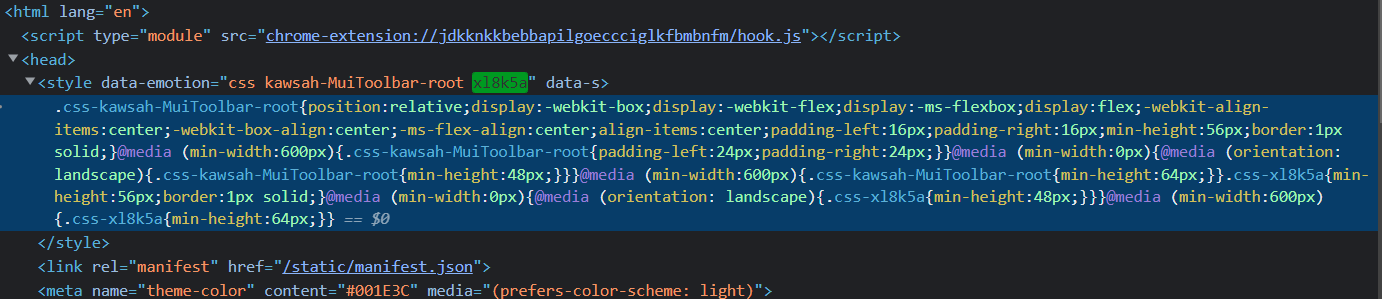 Notice the media query styles of the Box component. ~However, I couldn't find any reason as to why it is happening after a lot of debugging.~ I think it's something to do with the `styleFunctionSx` function because the mixins works correctly with the `styled` API and also with raw media queries. Other reason is that mixins work in the `Toolbar` component because it is wrapped with the styled API. Any customized mixins defined in `theme` are just merged in the createMixins method. So those won't get affected. ~Regarding tests, I couldn't test responsive styles by resizing the window in karma browser testing for both `Toolbar` and with `Box`. I think we need an e2e test. Let me know how.~ Verified manually that it works: **Before:** https://codesandbox.io/s/mystifying-hoover-yf2ehh?file=/src/App.js **Now**: https://codesandbox.io/s/polished-pond-hq4vkr?file=/src/App.js ---- Fixes #31358 Fixes #27532 ---- Default theme object changed for `mixins.toolbar` (Preview: https://deploy-preview-32713--material-ui.netlify.app/material-ui/customization/default-theme/) ## Repository Information - **Repository**: mui/material-ui - **Pull Request**: #32713 - **Base Commit**: `8a86d1e375943d33ddb4a19f272e8432ba1fa5c3` ## Related Issues - https://github.com/mui/material-ui/issues/27532 </issue_description> Can you help me implement the necessary changes to the repository so that the requirements specified in the <issue_description> are met? I've already taken care of all changes to any of the test files described in the <issue_description>. This means you DON'T have to modify the testing logic or any of the tests in any way! Also the development Typescript environment is already set up for you (i.e., all dependencies already installed), so you don't need to install other packages. Your task is to make the minimal changes to non-test files in the /workspace/material-ui directory to ensure the <issue_description> is satisfied. Follow these phases to resolve the issue: Phase 1. READING: read the problem and reword it in clearer terms 1.1 If there are code or config snippets. Express in words any best practices or conventions in them. 1.2 Highlight message errors, method names, variables, file names, stack traces, and technical details. 1.3 Explain the problem in clear terms. 1.4 Enumerate the steps to reproduce the problem. 1.5 Highlight any best practices to take into account when testing and fixing the issue. Phase 2. RUNNING: install and run the tests on the repository 2.1 Follow the readme. 2.2 Install the environment and anything needed. 2.3 Iterate and figure out how to run the tests. Phase 3. EXPLORATION: find the files that are related to the problem and possible solutions 3.1 Use `grep` to search for relevant methods, classes, keywords and error messages. 3.2 Identify all files related to the problem statement. 3.3 Propose the methods and files to fix the issue and explain why. 3.4 From the possible file locations, select the most likely location to fix the issue. Phase 4. TEST CREATION: before implementing any fix, create a script to reproduce and verify the issue 4.1 Look at existing test files in the repository to understand the test format/structure. 4.2 Create a minimal reproduction script that reproduces the located issue. 4.3 Run the reproduction script with `npx ts-node <filename.ts>` to confirm you are reproducing the issue. 4.4 Adjust the reproduction script as necessary. Phase 5. FIX ANALYSIS: state clearly the problem and how to fix it 5.1 State clearly what the problem is. 5.2 State clearly where the problem is located. 5.3 State clearly how the test reproduces the issue. 5.4 State clearly the best practices to take into account in the fix. 5.5 State clearly how to fix the problem. Phase 6. FIX IMPLEMENTATION: Edit the source code to implement your chosen solution. 6.1 Make minimal, focused changes to fix the issue. Phase 7. VERIFICATION: Test your implementation thoroughly. 7.1 Run your reproduction script to verify the fix works. 7.2 Add edge cases to your test script to ensure comprehensive coverage. 7.3 Run existing tests related to the modified code with `npm test` to ensure you haven't broken anything. Phase 8. FINAL REVIEW: Carefully re-read the problem description and compare your changes with the base commit 8a86d1e375943d33ddb4a19f272e8432ba1fa5c3. 8.1 Ensure you've fully addressed all requirements. 8.2 Run any tests in the repository related to: 8.2.1 The issue you are fixing 8.2.2 The files you modified 8.2.3 The functions you changed 8.3 If any tests fail, revise your implementation until all tests pass. Be thorough in your exploration, testing, and reasoning. It's fine if your thinking process is lengthy - quality and completeness are more important than brevity. IMPORTANT CONSTRAINTS: - ONLY modify files within the /workspace/material-ui directory - DO NOT navigate outside this directory (no `cd ..` or absolute paths to other locations) - DO NOT create, modify, or delete any files outside the repository - All your changes must be trackable by `git diff` within the repository - If you need to create test files, create them inside the repository directory ``` --- Harness Report runs agent harnesses from their GitHub repos on Harbor tasks and records every model call. Every page is also `.md` and `.json`; index: https://harnessreport.com/llms.txt · MCP: https://harnessreport.com/mcp